Sunday, 1 July 2012

Storage Class

Storage Class:

Every variable and function in C programming has two properties: type and storage class. Type refers to the data type of variable whether it is character or integer or floating-point value etc.
There are 4 types of storage class:

  • automatic
  • external
  • static
  • register

Automatic storage class:

Keyword for automatic variable:

auto
 
 
Variables declared inside the function body are automatic by default. These variable are also known as local variables as they are local to the function and doesn't have meaning outside that function
Since, variable inside a function is automatic by default, keyword auto are rarely used.

External storage class:

External variable can be accessed by any function. They are also known as global variables. Variables declared outside every function are external variables.
In case of large program, containing more than one file, if the global variable is declared in file 1 and that variable is used in file 2 then, compiler will show error. To solve this problem, keyword extern is used in file 2 to indicate that, the variable specified is global variable and declared in another file.


Static Storage Class:

The value of static variable persists until the end of the program. A variable can be declared static using keyword: static. For example:

static int i;


Register Storage Class:

Keyword to declare register variable:

register
 
 
Example of register variable:

register int a;
 
Register variables are similar to automatic variable and exists inside that particular function only.
If the compiler encounters register variable, it tries to store variable in microprocessor's register rather than memory. Value stored in register are much faster than that of memory.
In case of larger program, variables that are used in loops and function parameters are declared register variables.
Since, there are limited number of register in processor and if it couldn't store the variable in register, it will automatically store it in memory.


Modular programming & C Functions

Modular programming:

 A programming style that braks down program functions into modules, each of which accomplishes one function and contains all the source code and variables needed to accomplish that function. Modular programming is a solution to the problem of very large programs that are difficult to debug and maintain. By segmenting the program into modules that perform clearly defined functions, you can determine the source of program erros more easly. Object-orientated programming languages, such as SmallTalk and HyperTalk, incorporate modular programming principles.


Function:

A function in programming is a segment that groups a number of program statements to perform specific task.
A C program has atleast one function [ main( ) ]. Without main() , there is technically no C program.

Types of C functions:

Basically, there are two types of functions in C on basis of whether it is defined by user or not.
  • Library function
  • User defined function

Library function:

Library functions are the in-built function in C programming system. For example:
main()
- The execution of every C program starts from this main. 
printf()
- prinf() is used for displaying output in C.
scanf()
- scanf()  is used for taking input in C.
Visit this page to learn more about library functions in C programming.

User defined function

C provides programmer to define their own function according to their requirement known as user defined functions.

Example of how C function works:

#include <stdio.h>
void function_name(){
................
................
}
int main(){
...........
...........
function_name();
...........
...........
} 
 
 
As mentioned earlier, every C program begins from main() and program starts executing the codes inside main function. When the control of program reaches to function_name() inside main. The control of program jumps to "void function_name()" and executes the codes inside it. When, all the codes inside that user defined function is executed, control of the program jumps to statement just below it. Analyze the figure below for understanding the concept of function in C.

Working of functions in C programming


Remember, the function name is an identifier and should be unique.

Advantages of user defined functions:

  • User defined functions helps to decompose the large program into small segments which makes programmar easy to understand, maintain and debug.
  • If repeated code occurs in a program. Function can be used to include those codes and execute when needed by calling that function.
  • Programmar working on large project can divide the workload by making different functions.


Function prototype(declaration):

Every function in C programming should be declared before they are used. These type of declaration are also called function prototype. Function prototype gives compiler information about function name, type of arguments to be passed and return type.

Syntax of function prototype:

return_type function_name(type(1) argument(1),....,
type(n) argument(n));

Here, in the above example, function prototype is "int add(int a, int b);" which provides following information to the compiler:
  1. name of the function is "add"
  2. return type of the function is int.
  3. two arguments of type int are passed to function.
Function prototype is not needed, if you write function definition above the main function. In this program if the code from line 12 to line 19 is written above main( ), there is no need of function prototype.

Function call:

Control of the program cannot be transferred to user-defined function (function definition) unless it is called (invoked).

Syntax of function call:

function_name(argument(1),....argument(n));
 
In the above example, function call is made using statement "add(num1,num2);" in line 8. This makes control of program transferred to function declarator(line 12). In line 8, the value returned by function is kept into "sum" which you will study in detail in function return type of this chapter.

Function definition:

Function definition contains programming codes to perform specific task.

Syntax of function definition:

return_type function_name(type(1) argument(1),.
....,type(n) argument(n))
{
                //body of function
} 
 
 
Function definition has two major components:

1. Function declarator:

Function declarator is the first line of function definition. When a function is invoked from calling function, control of the program is transferred to function declarator or called function.

Syntax of function declarator

return_type function_name(type(1) argument(1),....,type(n) argument(n))
Syntax of function declaration and declarator are almost same except, there is no semicolon at the end of declarator and function declarator is followed by function body.
In above example, " int add(int a,int b)" in line 12 is function declarator.

2. Function body:

Function declarator is followed by body of function which is composed of statements.
In above example, line 13-19 represents body of a function.

Passing arguments to functions

In programming, argument/parameter is a piece of data(constant or  variable) passed from a program to the function.
In above example two variable, num1 and num2 are passed to function during function call and these arguments are accepted by arguments a and b in function definition.

Passing argument/parameter through function in C

Arguments that are passed in function call and arguments that are accepted in function definition should have same data type. For example:
If argument num1 was of int type and num2 was of float type then, argument a should be of int type and b should be of float type in function definition. i.e. type of argument during function call and function definition should be same.
A function can be called with or without an argument.

Return Statement:

Return statement is used for returning a value from function definition to calling function.

Syntax of return statement

return (expression;
          OR
     return;     

For example:

return;
return a;
return (a+b);
 
 
In above example of source code, add is returned (line 18) to the calling function add(num1,num2); (line 8) and this value is stored in variable sum.
Note that, data type of add is int and also the return type of function is int. The data type of expression in return statement should also match the return type of function.

Working of return statement in C


C Decisions & Loops


if...else Statement:

Decision making are needed when, the program encounters the situation to choose a particular statement among many statements. C programming provides following statements to make decision makings:
  • if...else statement
  • switch statement

if (test expression)
     statements to be executed if test expression is true;


Branching in C programming using if statement

Nested if...else statement (if...elseif....else Statement):

The if...else statement can be used in nested form when a serious decision are involved. The ANSI standard specifies that 15 levels of nesting may be continued.

Syntax of nested if...else statement:

if (test expression)
     statements to be executed if test expression is true;
else
     if(test expression 1)
          statements to be executed if test expressions 1 is true;
       else 
          if
           .
           .
           .
            else
              statements to be executed if all test expressions are false;
How nested if...else works?
If the test expression is true, it will execute the relevant code but, if it is false, the control of the program jumps to the else part and check test expression 1 and the process continues. If all the test expression are fa;se then, only the last statement is executed.


for Loop

C programming loops:

Loops causes program to repeat the certain block of code until some conditions are satisfied. Loops are used in performing repetitive work in programming.

Syntax of for loop:

for(initial expression; test expression; update expression)
{
       codes to be executed; 
}

How for loops in C programming works?

The initial expression is initialized only once at the beginning of the for loop. Then, the test expression is checked by the program.
If the test expression is false, for loop is terminated.
If test expression is true then, the codes are executed and update expression is updated. Again, the test expression is checked. If it is false, loop is terminated and if it is true, the same process repeats until test expression is false.
For the easier understanding of how for loop works, analyze the flowchart of for loop below.
Flowchart of for loop in C programming language


Importent:
  • Initial, test and update expression in C for loop are separated by semicolon(;).
  • Two or more expression of same type  in for loop are separated by comma(,).

o...while Loop

C programming loops

Loops causes program to repeat the certain block of code until some conditions are satisfied. Loops are used in performing repetitive work in programming.

C while loops:

Syntax of while loop:

 
while (test expression)
{
     statements to be executed.  
}


In the beginning of while loop, test expression is checked. If it is true, codes inside the body of while loop is executed and again the test expression is checked and process continues until, the test expression becomes false.


Flowchart of while loop in C programming


C do...while loops:

C do...while loop is very similar to while loop. Only difference between these two loops is that, in while loops, test expression is checked at first but, in do...while loop code is executed at first then the condition is checked. So, the code are executed at least once in do...while loops.

Syntax of do...while loops:

do {
   some codes;
}
while (test expression); 
 
At first codes inside body of do is executed. Then, the test expression is checked. If it is true(nonzero), codes inside  body of do are executed again and the process continues until test expression is zero(false).
Notice, there is semicolon in the end of while (); in do...while loop.


Flowchart of working of do...while loop in C programming.


break and continue Statement:

There are two statement built in C, break; and continue; to interrupt the normal flow of control of  a program. Loops performs a set of operation repeately until certain control variable fails but, it is sometimes desirable to skip some statements inside loop and terminate the loop immediately without checking the test expression. In such cases, break and continue statements are used.

C break statement:

In C programming, break is used in terminating the loop immediately after it is encountered. The break statement is used with conditional if statement.

Syntax of break statement:

break; 
 
The break statement can be used in terminating all three loops for, while and do...while loops.


Flowchart of break statement in C programming.
 For better understanding of how break statements works in C programming loops. Anlayze the illustration of exiting a loop with break statement below.


working of break statement in C programming in for, while and do...while loops


C continue statement:

It is sometimes desirable to skip some statements inside the loop. In such cases, continue statements are used. Continue statements are only used in while, do...while and for loops in C programming.

Syntax of continue statement:

continue; 
 
Just like break, continue is also used with conditional if statement.

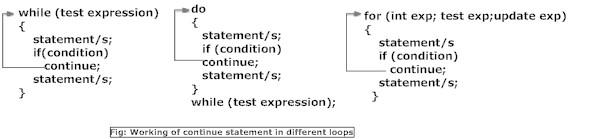
 For better understanding of how continue statements works in C programming. Analyze the illustration of bypassing and continuing in loops below.

Working of continue statement in  C programming for, while and do...while loops


switch....case Statement:

Decision making are needed when, the program encounters the situation to choose a particular statement among many statements. If a programmar has to choose one among many alternatives if...else can be used but, this makes programming logic complex. This type of problem can be handled in C using switch...case statement.

Syntax of C switch...case:

switch (expression)
{
case constant1:
   codes to be executed if expression equals to constant1;
   break;
case constant2:
   codes to be executed if expression equals to constant3;
   break;
   .
   .
   . 
default:
   codes to be executed if expression doesn't match to any cases;
}

In switch...case, expression is an integer or character expression asked to a user. If the value of switch expression matches any of the constant in cases, the relevant codes are executed and control moves out of the switch case statement. If the expression doesn't matches any of the constant in cases, then the default statement is executed.


Working of C switch...case statement in C programming.


goto Statement:

The goto statement in C is used to alter the normal sequence of program execution by transferring control to some other part of the program.

Syntax of goto statement:

goto label;
.............
.............
.............
label: 
statement; 
 
 
In this syntax, label is an identifier. When, the control of program reaches to goto label statement, the control of the program will jump to the label.
Working of goto statement in C programming


Reasons to avoid goto statement:

Though, using goto statement give power to programmar to jump to any part of program, using goto statement in programming makes the logic of the program complex and tangled. In modern programming, goto statement is considered a harmful construct and a bad programming practice.
The goto statement can be replaced in most of  C program with the use of break and continue statements. In fact, any program in C programming can be perfectly written without the use of goto statement. All programmar should try to avoid goto statement as possible as they can.

Operators available in C

Operators

Operators are the symbol which operates on value or a variable. For example: + is a operator to perform addition.
C programming language has wide range of operators to perform operations. For better understanding of operators in C, these operators can be classified as:

Operators in C programming
Arithmetic Operators
Increment and Decrement Operators
Assignment Operators
Relational Operators
Logical Operators
Conditional Operators
Bitwise Operators


Arithmetic Operators:

Operator Meaning of Operator
+ addition or unary plus
- subtraction or  unary minus
* multiplication
/ division
% remainder after division( modulo division)


Increment and decrement operators:

In C, ++ and -- are called increment and decrement operators respectively. Both of these operators are uniary operators, i.e, used on single operand. ++ adds 1 to operand and -- subtracts 1 to operand respectively. For example:

Let a=5 and b=10
a++;  //a becomes 6
++a;  //a becomes 7
--b;  //b becomes 9
b--;  //b becomes 8 

Assignment Operators:

The most common assignment operator is '='. This operator assigns the value in right side to the left side. For example:
var=5  //5 is assigned to var
a=c;   //value of c is assigned to a
5=c;   // Error! 5 is a constant and its value can't be changed. 
Operator Example Same as
= a=b a=b
+= a+=b a=a+b
-= a-=b a=a-b
*= a*=b a=a*b
/= a/=b a=a/b
%= a%=b a=a%b


Relational Operator:

Relational operators are used to test relationship between two operands. If the relation is true, it returns value 1 and if the relation is false, it returns value 0. For example:
a>b
Here, > is a relational operator. If a is greater than b, a>b returns 1 if not then, it returns 0.
Relational operators are normally used in decision making and loops in C programming.
Operator Meaning of Operator Example
== Equal to 5==3 returns false (0)
> Greater than 5>3 returns true (1)
< Less than 5<3 returns false (0)
!= Not equal to 5!=3 returns true(1)
>= Greater than or equal to 5>=3 returns true (1)
<= Less than or equal to 5<=3 return false (0)

Logical Operators

Logical operators are used to combine expressions containing relation operators. In C, there are 3 logical operators.
Operator Meaning of Operator Example
&& Logial AND  If c=5 and d=2 then,((c==5) && (d>5)) returns false.
|| Logical OR If c=5 and d=2 then, ((c==5) || (d>5)) returns true.
! Logical NOT If c=5 then, !(c==5) returns false.


Conditional Operator:

Conditional operator takes three operands and consists of two symbols ? and : . Conditional operators are used for decision making in C. For example:
 
c=(c>0)?10:-10; 
 
If c is greater than 0, value of c will be 10 but, if c is less than 0, value of c will be -10.
To learn more, visit conditional operators page.


Bitwise Operators:

A bitwise operator works on each bit of data. Bitwise operators are used in bit level programming.
Operators Meaning of operators
& Bitwise AND
| Bitwise OR
^ Bitwise exclusive OR
~ Bitwise complement
<< Shift left
>> Shift right
Bitwise operator is advance topic in programming . You go further in C programming without knowing bitwise programming


C Programming : Data Types

C Programming Data Types

In C, variables(datas) should be declared before it can be used in program. Data types are the keywords, which is used for assigning a type to a variable.

Data types in C:

Data values passed in a program may be of different types. Each of these data types are represented differently within the computer’s memory and have different memory requirements. These data types can be augmented by the use of data type qualifiers/modifiers.
  1. Fundamental Data Types
    • Integer types
    • Floating Type
    • Character types
  2.  Derived Data Types
    • Arrays
    • Pointers
    • Structures
    • Enumeration

      int:

      It is used to store an integer quantity. An ordinary int can store a range of values from INT_MIN to INT_MAX as defined by in header file <limits.h>. The type modifiers for the int data type are: signed, unsigned, short, long  and long long.


    • A short int occupies 2 bytes of space and a long int occupies 4 bytes.
    • A short unsigned int occupies 2 bytes of space but it can store only positive values in the range of 0 to 65535.
    • An unsigned int has the same memory requirements as a short unsigned int. However, in case of an ordinary int, the leftmost bit is reserved for the sign.
    • A long unsigned int occupies 4 bytes of memory and stores positive integers in the range of 0 to 4294967295.
    • By default the int data type is signed.
    • A long long int occupies 64 bits of memory. It may be signed or unsigned. The signed long long int stores values from −9,223,372,036,854,775,808 to 9,223,372,036,854,775,807 and the unsigned long long ranges from 0 to 18,446,744,073,709,551,615.

    char:

    It stores a single character of data belonging to the C character set. It occupies 1 byte of memory, and stores any value from the C character set. The type modifiers for char are signed and unsigned.
    Both signed and unsigned char occupy 1 byte of memory but the range of values differ. An unsigned char can store values from 0 to 255 and a signed char can store values from -128 to +127. Each char type has an equivalent integer interpretation, so that a char is really a special kind of short integer. By default, char is unsigned.

    float:

    It is used to store real numbers with single precision i.e. a precision of 6 digits after decimal point. It occupies 4 bytes of memory. The type modifier for float is long. It has the same memory requirements as double.


    double:

    It is used to store real numbers with double precision. It occupies 8 bytes of memory. The type modifier for double is long. A long double occupies 10 bytes of memory.

    void:

    It is used to specify an empty set containing no values. Hence, it occupies 0 bytes of memory.


    User defined type declaration:

    C language supports a feature where user can define an identifier that characterizes an existing data type. This user defined data type identifier can later be used to declare variables. In short its purpose is to redefine the name of an existing data type.


    Syntax:


     typedef <type> <identifier>; like
    typedef int number;

    Now we can use number in lieu of int to declare integer variable. For example: “int x1” or “number x1” both statements declaring an integer variable. We have just changed the default keyword “int” to declare integer variable to “number”.


    Data Types in C, Size & Range of Data Types:

     C language supports various data types, this charts shows you how much space each data type like int, char, float occupies space in memory along with its data range and keyword used by programmer in C program.
     C language supports various data types, this charts shows you how much space each data type like int, char, float occupies space in memory along with its data range and keyword used by programmer in C program.

C Programming : Variables and Constants , life time of variables local global and static function proto type

Variables:

Variables are memory location in computer's memory to store data. To indicate the memory location, each variable should be given a unique name called identifier. Variable names are just the symbolic representation of a memory location. Examples of variable name: sum, car_no, count etc.

int num;
Here, num is a variable of integer type.

Rules for writing variable name in C:

  1. Variable name can be composed of letters (both uppercase and lowercase letters), digits and underscore '_' only.
  2. The first letter of a variable should be either a letter or an underscore. But, it is discouraged to start variable name with an underscore though it is legal. It is because, variable name that starts with underscore can conflict with system names and compiler may complain.
  3. There is no rule for the length of length of a variable. However, the first 31 characters of  a variable are discriminated by the compiler. So, the first 31 letters of two variables in a program should be different.
In C programming, you have to declare variable before using it in the program.

Constants:

Constants are the terms that can't be changed during the execution of a program. For example: 1, 2.5, "Programming is easy." etc. In C, constants can be classified as:

Integer constants:

Integer constants are the numeric constants(constant associated with number) without any fractional part or exponential part. There are three types of integer constants in C language: decimal constant(base 10), octal constant(base 8) and hexadecimal constant(base 16) .
Decimal digits: 0 1 2 3 4 5 6 7 8 9
Octal digits: 0 1 2 3 4 5 6 7
Hexadecimal digits: 0 1 2 3 4 5 6 7 8 9 A B C D E F.
For example:
Decimal constants: 0, -9, 22 etc
Octal constants: 021, 077, 033 etc
Hexadecimal constants: 0x7f, 0x2a, 0x521 etc
Notes:
  1. You can use small caps a, b, c, d, e, f instead of uppercase letters while writing a hexadecimal constant.
  2. Every octal constant starts with 0 and hexadecimal constant starts with 0x in C programming.

Floating-point constants:

Floating point constants are the numeric constants that has either fractional form or exponent form. For example:
-2.0
0.0000234
-0.22E-5
Note:Here, E-5 represents 10-5. Thus, -0.22E-5 = -0.0000022.

Character constants:

Character constants are the constant which use single quotation around characters. For example: 'a', 'l', 'm', 'F' etc.

Escape Sequences:

Sometimes, it is necessary to use newline(enter), tab, quotation mark etc. in the program which either cannot be typed or has special meaning in C programming. In such cases, escape sequence are used. For example: \n is used for newline. The backslash( \ ) causes "escape" from the normal way the characters are interpreted by the compiler.

 Escape       Sequences Character
\b  Backspace
\f                  Form feed
\n Newline
\r Return
\t Horizontal tab
\v Vertical tab
\\ Backslash
\' Single quotation mark
\" Double quotation mark
\? Question mark
\0 Null character

String constants:

String constants are the constants which are enclosed in a pair of double-quote marks. For example:
"good"                    //string constant
""                       //null string constant
"      "                //string constant of six white space
"x"                    //string constant having single character.
"Earth is round\n"    //prints string with newline

Enumeration constants:

Keyword enum is used to declare enumeration types. For example:
 
enum color {yellow, green, black, white};
 
Here, the variable name is color and yellow, green, black and white are the enumeration constants having value 0, 1, 2 and 3 respectively by default. For more information about enumeration,


charset identifier and keyword


C Programming Keywords and Identifiers:

Character set:

Character set are the set of alphabets, letters and some special characters that are valid in C language.

Alphabets
Uppercase: A B C  ....................................  X Y Z
Lowercase: a b c  ......................................  x y z

Digits:
0 1 2 3 4 5 6  8 9


Special Characters:     

Special Characters in C language


+  -  * /  = % & # ! ? ^ ” ‘ /  | < > ( ) [  ]  {  } : ; . , ~ @ ! \

The white spaces used in C programs are: blank space, horizontal tab, carriage return, new line and form feed.


Identifiers and Keywords:

Identifiers

In C programming, identifiers are names given to C entities, such as variables, functions, structures etc. Identifier are created to give unique name to C entities to identify it during the execution of program. For example:

int money;
int mango_tree;

Here, money is a identifier which denotes a variable of type integer. Similarly, mango_tree is another identifier, which denotes another variable of type integer.

Rules for writing identifier
  1. An identifier can be composed of letters (both uppercase and lowercase letters), digits and underscore '_' only.
  2. The first letter of identifier should be either a letter or an underscore. But, it is discouraged to start an identifier name with an underscore though it is legal. It is because, identifier that starts with underscore can conflict with system names. In such cases, compiler will complain about it. Some system names that start with underscore are _fileno, _iob, _wfopen etc.
  3. There is no rule for the length of an identifier. However, the first 31 characters of an identifier are discriminated by the compiler. So, the first 31 letters of two identifiers in a program should be different.
Tips for Good Programming Practice :
Programmer can choose the name of identifier whatever they want. However, if the programmer choose meaningful name for an identifier, it will be easy to understand and work on, particularly in case of large program.


Identifiers are names given to various program elements such as variables, functions, and arrays. Identifiers consist of letters and digits, in any order, except that the first character must be a letter. Both uppercase and lowercase letters are permitted and the underscore may also be used, as it is also regarded as a letter. Uppercase and lowercase letters are not equivalent, thus not interchangeable. This is why it is said that C is case sensitive. An identifier can be arbitrarily long.
The same identifier may denote different entities in the same program, for example, a variable and an array may be denoted by the same identifier, example below.

int sum, average, A[10]; // sum, average and the array name A are all identifiers.

The _ _func_ _ predefined identifier:-

The predefined identifier __func__ makes a function name available for use within the function. Immediately following the opening brace of each function definition, _ _func_ _ is implicitly declared by the compiler in the following way:


static const char _ _func_ _[] = "function-name";

where function-name is the name of the function.
consider the following example
 
 
#include <stdio.h>
void func1(void)    {
         printf("%s\n",__func__);
         return;
}
int main() {
     myfunc();
}
The output would be
func1

Keywords

Keywords are reserved words that have standard predefined meanings. These keywords can only be used for their intended purpose; they cannot be used as programmer defined identifiers. Examples of some keywords are: int, main, void, if.


Keywords in C Language:

auto double int struct
break else long switch
case enum register  typedef
char extern return union
continue for signed void
do if static  while
default goto sizeof volatile
const float short unsigned